
Ace Studio and StepFun have released an update to their text-to-audio model Ace-Step. Their goal is to bring commercial music generation to consumer hardware. So it’s right up my alley: on-device AI.
Since I’m not a musician or producer, but just an AI enthusiast, I can only judge the quality subjectively as a music lover. To me, Ace-Step sounds comparable to the results from Suno and Udio. It comes with an MIT license and can be used commercially without restrictions.
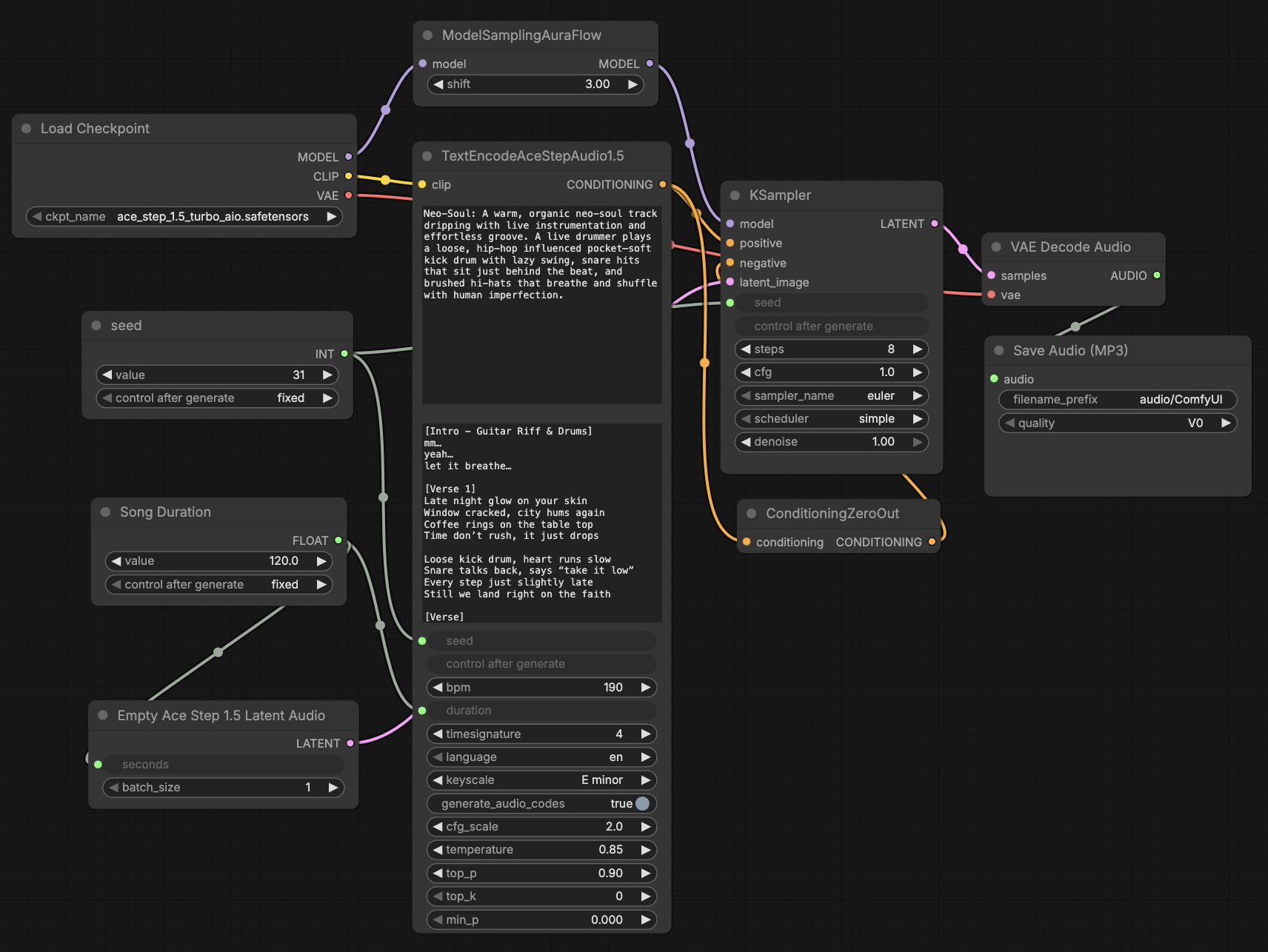
The best thing about Ace-Step is its on-device capability and speed. I can generate a 2-minute song on my MacBook in about 4 minutes. On devices with Nvidia chips, you can get these songs in just a few seconds. Thanks to support for more than 50 languages and flexible controls, songs can be created in different styles and genres. Integration with ComfyUI makes it easy to get started. With ready-made templates in a graphical user interface, you can focus on creative prompts and lyrics. This allows AI enthusiasts without in-depth programming knowledge to benefit from state-of-the-art music generation.
I can imagine that content creators and podcasters will use Ace-Step to generate intro music or sound effects for videos and games in the future. I’ve also noticed some fun projects in my circle (birthday songs, shooting festival songs, etc.).
I saved the best for last. Users can train LoRAs using just a few songs to capture their own style. I’ve already discovered a Michael Jackson LoRa and song on Reddit. I’m excited to see where this takes us.
Tips and pitfalls
Choose precise style tags: Describe the genre, instruments, mood, tempo, and vocal style as accurately as possible. An example tag could be: “rock, alternative rock, clear male vocals, energetic, electric guitar, drums, 120 bpm.”
Control song structure with lyrics tags: Use words such as [verse], [chorus], [bridge] in the text to control the flow of the song. This creates a clearer structure with verses and choruses.
Use batch generation: Set batch_size to 8 or 16 and generate multiple variants. Then select the best version. The model may vary slightly for identical inputs, so a batch result increases the chances of a convincing result.
Hardware considerations: Devices with CUDA GPUs deliver the best times (e.g., under 10 seconds per song on an RTX 3090). The model runs on Apple Macs with MPS, but noticeably slower. Expect longer wait times with lower performance.
Here is the sample song from the ComfyUI template. Generated on my MacBook in 4 minutes: